

Built Technologies Draw Agent: Less time on task per draw review
LENDING USE CASES
Construction Draw Review Automation
MightyBot automates construction draw reviews. 90-minute reviews done in minutes. 99%+
accuracy. Every policy enforced. In production today with Built Technologies.
What is Construction Draw Review Automation?
Construction draw review automation checks each draw request against the budget, the inspection, and the loan agreement before money moves: line items reconciled, retainage and lien waivers verified, exceptions flagged with evidence. This is the workflow behind Built Technologies' production draw agent.
Automate Construction Draw Reviews
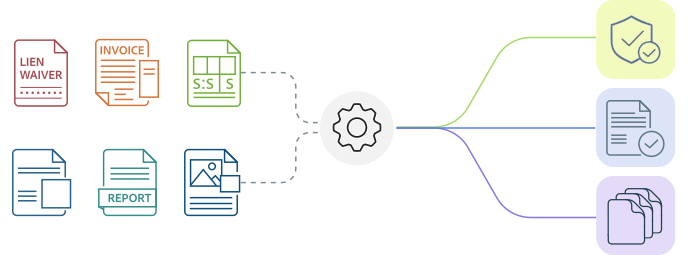
Every draw request arrives as a large packet of lien waivers, invoices, inspection reports, change orders, budget line items, jobsite photos. Different formats every time. MightyBot processes the entire packet, enforces every policy, and produces audit-ready approvals in minutes.
Why manual draw reviews slow funding
A single draw review requires cross-referencing every document against the approved budget, verifying lien waivers match payment history, confirming inspections support work claimed, and flagging violations - before releasing funds. At scale, lenders face an impossible choice between speed and thoroughness. Inconsistency across reviewers compounds everything.
Document parsing
Inspection reports, invoices, lien waivers, budgets in different formats every time
Photo validation
Verify completion claims against photographic evidence across dozens of images
Cross-referencing
Match submissions to approved line items and loan-specific policies
Calculations
Disbursement amounts, retainage holdbacks, budget variance - zero error tolerance
Policy enforcement
Lender rules vary by loan type, borrower, project phase, and jurisdiction
Documentation
Full evidence trail linking every decision to source data
How MightyBot automates draw reviews
-
Parallel document intake
Entire packet ingested and classified simultaneously. Lien waivers, invoices, reports, change orders, photos.
-
Budget reconciliation
Every amount validated against original allocation, prior draws, remaining balance, retainage. Discrepancies flagged with source evidence.
-
Lien waiver validation
Cross-referenced against payment history. Conditional-to-unconditional upgrades verified. Missing waivers flagged before fund release.
-
Deterministic policy enforcement
Retainage, inspection requirements, draw limits, over-budget thresholds enforced identically every time. Edge cases handled.
-
Exception routing
Exceptions routed with full context and evidence. Reviewers make decisions - they don't reprocess.
Before vs After
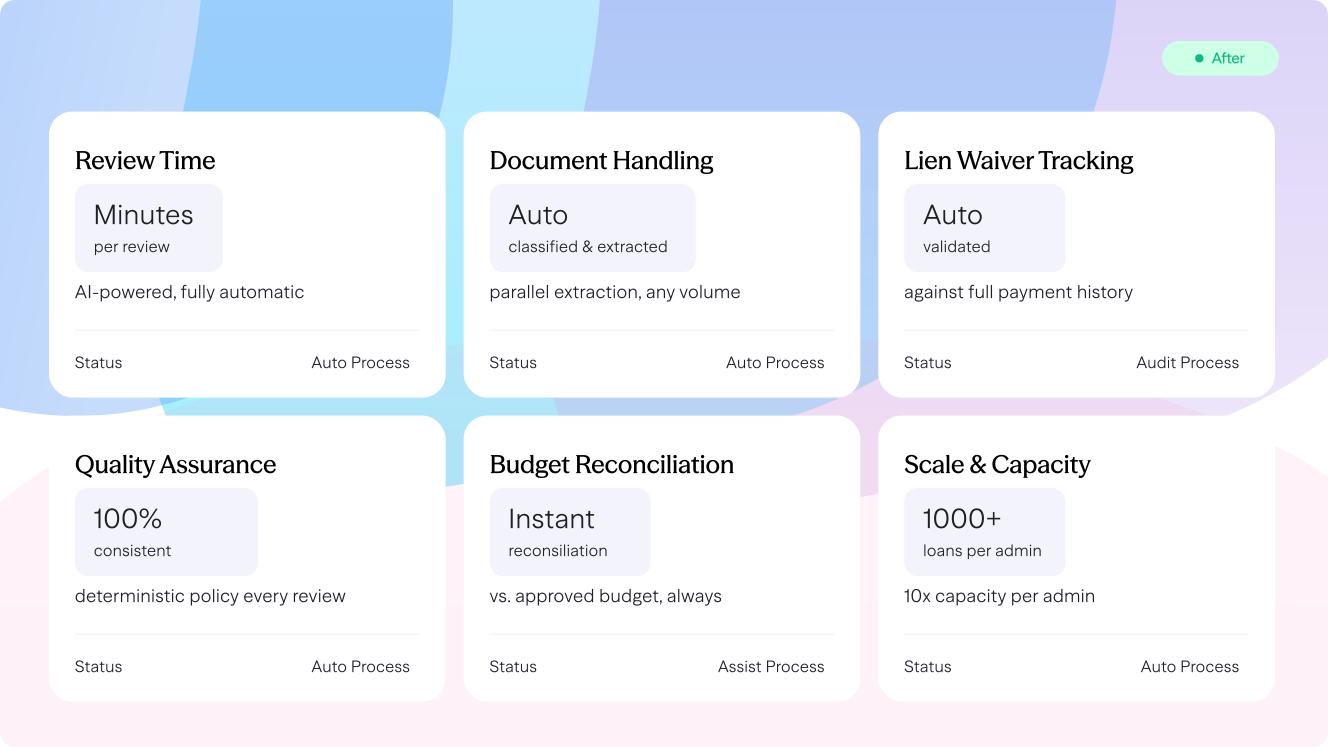
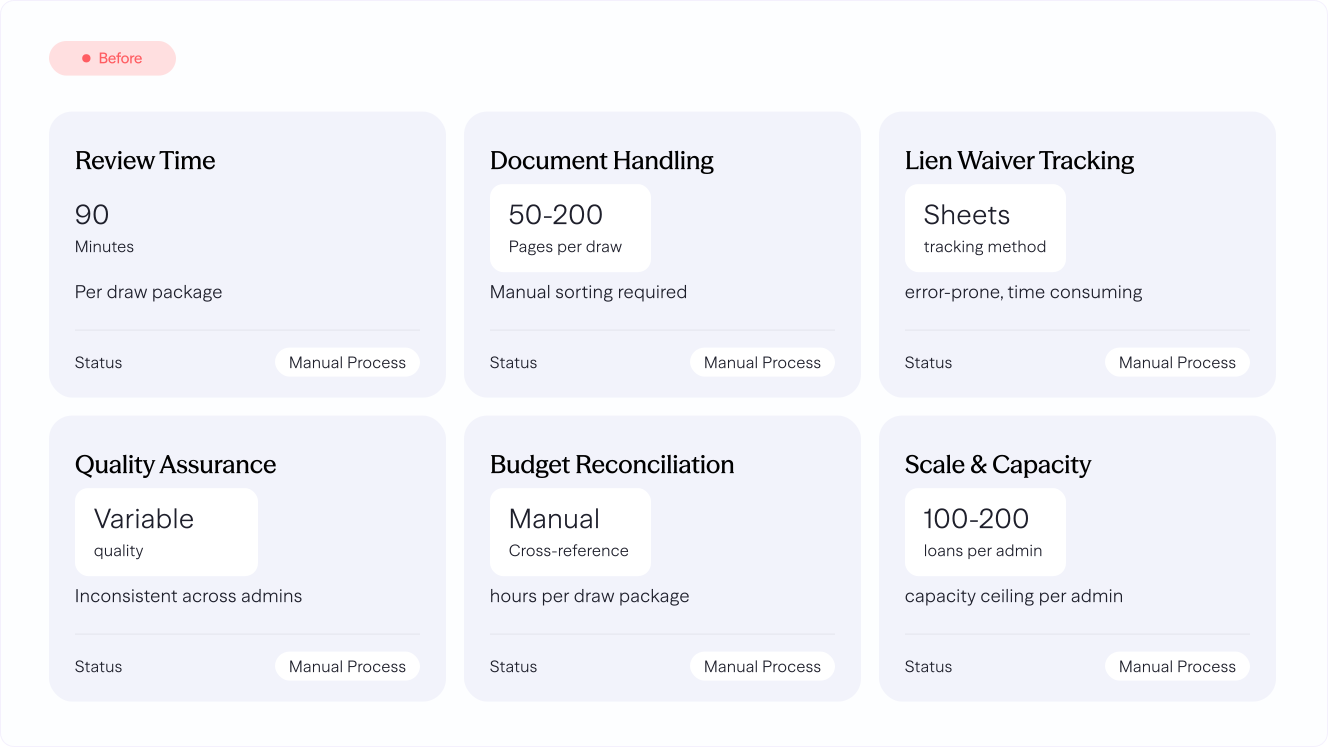
Production Metrics
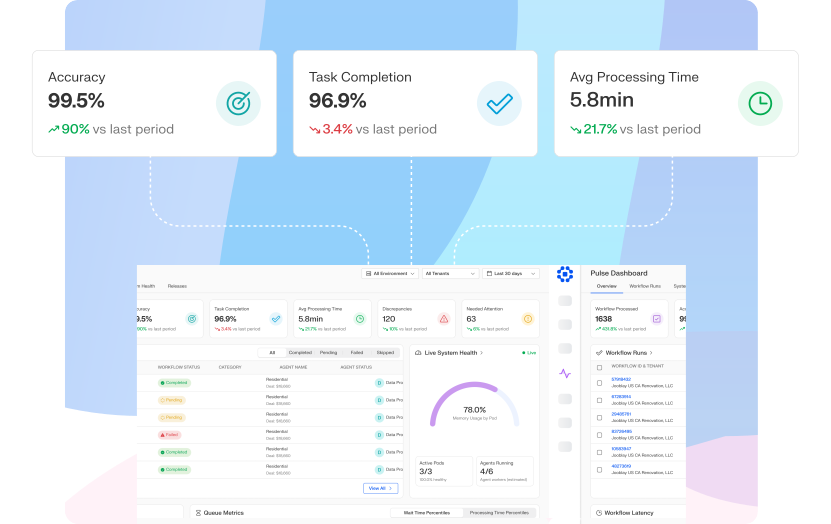
Measured in production. Built figures are from the Built Technologies draw-agent deployment; the others are from the MightyBot whitepaper (June 2026).
Built Technologies Draw Agent: Decision accuracy in production
Less processing time across MightyBot deployments
Throughput per loan administrator
Buyer's guide
How to automate construction draw reviews without loosening disbursement controls
What does a lender check on every draw, and where do reviews slow down?
A draw request is a package. On commercial projects it usually starts with the AIA G702 and G703. AIA's instructions say the forms show "the total dollar amount of the work completed and stored to date, the amount of retainage (if any), the total of previous payments, a summary of change orders, and the amount of current payment requested," broken out against a schedule of values.
Behind the forms sit invoices, conditional and unconditional lien waivers, the inspection report, a title update and any change orders. The reviewer ties each requested amount to the budget line, confirms the inspector's percent complete supports it, matches waivers to prior payments, and checks that the remaining budget still finishes the project.
Reviews slow down on the reconciling. A forty-line schedule of values against dozens of invoices and waivers takes an experienced administrator a long time per draw, and the borrower and contractor wait on funding while it happens.
How do AI agents review a draw, and should you audit, assist or automate?
Agents on the MightyBot platform read the whole package, including scanned invoices, waivers and inspection reports. They extract the amounts, dates, parties and line items, and keep a pointer from each value to its source page. Your draw policy is written in plain English and compiled into checks: budget to request by line, percent complete to inspection, waiver amounts to payments, retainage, change order approvals, and title conditions.
Each draw comes back with its checks passed or failed and the evidence behind every finding. MightyBot powers the Draw Agent at Built Technologies, which runs this review in production for construction lenders.
How much runs without a person is your call, and it can differ by loan type. In audit mode the agents run alongside your reviewers and you compare results. In assist mode the agents prepare the review and a person approves it. In automate mode clean draws proceed and exceptions route to a reviewer with the findings attached. The platform is built for teams to move through the three in that order.
What do examiners expect from draw controls?
The OCC's Commercial Real Estate Lending handbook lists the controls directly: "Effective controls include segregation of duties, site inspections, lien searches before disbursement, budget monitoring, and dual approval of loan disbursements." It adds that "The lender's title policy should be updated with each draw."
The interagency real estate lending guidelines state that "loan disbursements should not exceed actual development or construction outlays." The FDIC's construction lending examination module asks whether disbursements are "Made only after management reviews written inspection reports, requisite lien searches, and title updates" and whether draws are compared to the degree of completion.
The Federal Reserve's examination manual says "It is also important that the bank ascertain whether draws are being taken in accordance with the predetermined disbursement schedule." Automation that records each of these checks, with the documents attached, gives loan review and examiners the same file your administrator saw.
What to look for in draw review automation
Use these questions when you compare ways to speed up draw reviews.
- Does it read the entire draw package?G702 and G703 forms, invoices, lien waivers, inspection reports, title updates and change orders arrive as scans and PDFs from many parties. All of them should be read.
- Does it reconcile to the budget line by line?Requested amounts, prior draws, change orders, stored materials and retainage should tie out against the schedule of values, with each variance shown.
- Does it match lien waivers to payments?Conditional and unconditional waivers, amounts, through-dates and signers should be checked against what was paid, by contractor and subcontractor.
- Does it follow your draw policy?Inspection requirements, retainage, overrun tolerances and approval limits vary by lender and loan type. They should be written down, versioned and applied on every draw.
- Can you see why a draw passed or failed?Every finding should link to the page that supports it, and the record should be exportable for loan review, participants and examiners.
- Can you control the level of automation?Look for audit, assist and automate modes that you can set by loan type and change as results come in.
Manual review, a draw management system, and AI review agents compared
| Criterion | Manual checklist review | Draw management system | Draw management system with AI review agents |
|---|---|---|---|
| Reading documents | Administrator opens and reads every file. | Documents are collected and organized. People read them. | Agents read every document and extract the values. |
| Budget reconciliation | Done in a spreadsheet per draw. | Budget and draw history tracked in one place. | Each line reconciled automatically, variances listed. |
| Lien waivers and title | Checked by eye against a list. | Tracked as received or missing. | Amounts, dates and parties matched to payments. |
| Policy checks | Depend on the reviewer and the day. | Approval routing and required fields. | Every written rule tested on every draw. |
| Record for examiners | Checklist, emails and saved files. | Activity log and stored documents. | Each check, its result and its source pages. |
| Fits best when | A few active projects. | Many projects and parties to coordinate. | High draw volume, and funding speed matters to borrowers. |
The workflow that broke every automation tool for 30 years. We automated it.
Use-case map
How Construction Draw Review Automation works in MightyBot
MightyBot automates construction draw reviews by processing draw packets, reconciling budgets, lien waivers, invoices, inspections, and policies, and producing auditable approvals.
| Inputs | G702/G703 applications, budgets, lien waivers, invoices, inspection reports, jobsite photos, change orders, and funding policies. |
|---|---|
| Execution | Cross-references packet documents, reconciles line items, validates lien waiver compliance, checks inspection support, and enforces lender policies. |
| Outputs | Approval recommendations, exception packages, reduced draw amounts, risk flags, and funding-ready evidence records. |
| Audit trail | Every approval or exception links to the source packet, budget line, policy rule, and evidence pointer. |
| Best for | Lenders and owners reviewing high-volume draw packages where speed, policy consistency, and auditability determine funding velocity. |
Sources
Sources and verification
- OCC Comptroller's Handbook, Commercial Real Estate Lending (Version 2.0, March 2022)
- Interagency Guidelines for Real Estate Lending Policies, 12 CFR Part 34, Subpart D, Appendix A
- FDIC Examination Modules, Construction and Land Development Lending (10/25)
- Federal Reserve Commercial Bank Examination Manual, Section 2100.1 Real Estate Construction Loans
- AIA Contract Documents, Instructions for G702-1992 Application and Certificate for Payment
FAQ
Frequently Asked Questions
How do AI agents review construction loan draws?
They reconcile the draw request against the approved budget line by line, verify supporting documents (invoices, lien waivers, inspection reports), check loan-agreement conditions, and produce an approval recommendation with every check evidenced. Lenders keep approval authority.
How do lenders automate construction draw management and tracking?
Each draw request is checked against the approved budget line by line, with invoices, lien waivers and inspection reports verified and loan-agreement conditions applied as policies. Retainage balances and change orders are tracked against the budget as each draw comes in, and every recommendation carries a why-trail to the source pages. Exceptions route to a reviewer; the lender keeps approval authority.
What does construction draw automation change for lenders?
Draws stop waiting on manual document review: in Built Technologies' production deployment, draw processing runs dramatically faster with fewer manual steps, and every approval carries an audit trail. Borrower experience improves because the clock stops being the reviewer's backlog.
How long does it take to deploy?
Weeks, not months. MightyBot's extensible policy library covers standard construction lending rules. Your policies are configured in parallel with technical integration.
Can MightyBot handle inconsistent formats from different contractors?
Every contractor submits differently - that's the point. The Data Engine processes PDFs, scans, photos, and varied layouts. Canonicalization maps different field names to a consistent schema.
What happens when MightyBot finds a policy exception?
Exceptions are routed to a human reviewer with full context: policy triggered, extracted data, and evidence pointers to the source page. Reviewers decide on exceptions - they don't reprocess the draw.
Does MightyBot replace our loan origination system?
No. MightyBot wraps around your existing LOS, document management, and core banking via APIs. Results flow back automatically. One workflow. Multiple systems. Zero manual entry.
How does MightyBot handle retainage and change orders?
Retainage is tracked against policy requirements. Balances are recalculated when change orders modify the budget. Change orders are validated against approval authority thresholds.
What audit trail does MightyBot produce?
Every decision includes a why-trail tracing to the policy rule, extracted data, and source document pages. Evidence pointers let auditors verify any finding without re-reviewing the full packet.